Response RAIdar Vs. SEMRush: 7 Reasons Our AI Tracker Tool Is More User-Friendly
AI search is big. Really big. In fact, two-thirds of consumers believe that AI search platforms (like Google AI Mode and ChatGPT) will replace traditional search by the year 2030.
And the numbers are already showing a move in this direction. ChatGPT alone processes 2.5 billion prompts every day, with 800 million weekly users generating, brainstorming, and researching within OpenAI’s popular tool.
But how do you keep tabs on what AI search results are saying about your brand?
Well, our in-house tool, Response RAIdar, is currently one of the best methods out there. By setting up a list of pre-selected prompts, we can run the tool daily and give you a clear idea of:
1 – How you’re stacking up against your competitors in AI search results
2 – Which areas you might be falling behind on, revealing content gaps
3 – What places, people, and brands are appearing in AI responses alongside your business
The thing is, a few other big names have followed suit and launched their own AI search result analysis platforms. One big contender in this space is SEMRush, which you may recognise as the go-to hub for keyword research that’s used by SEO professionals every day.
The SEMRush AI Visibility tool achieves a similar output to Response RAIdar, and we’ve had a chance to explore what it’s capable of. Our verdict? Response RAIdar is better, clearer, and more user-friendly in many ways.
Let’s run through just seven of them, to stack up how SEO’s big player compares to our humble – yet mighty – AI visibility platform.
1: Ease of Navigation
The Response RAIdar approach:
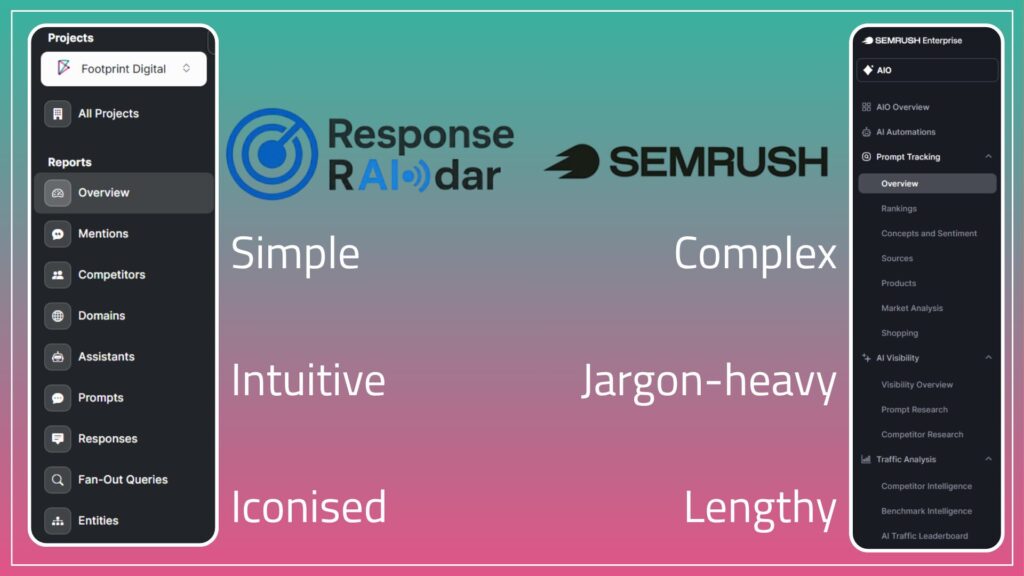
When you first launch Response RAIdar and select which project you want to explore, you’re presented with a drop-down menu that showcases everything that our AI tracker can do. This includes the likes of brand mentions, AI assistant visibility, and fan-out queries.
Each of these is given a simple yet recognisable icon, so you can easily navigate through the side menu and find what you’re looking for. The language is straightforward, and you’re not left scratching your head (as can often be the case in the complex, jargon-heavy world of SEO!).
The SEMRush approach:
Open the SEMRush tool, however, and things become a bit more complicated. The top-level options make enough sense – prompt tracking and AI visibility being two of the most useful – but each of these has a number of sub-options that immediately confuse things.
Options like ‘Shopping’ and ‘Competitor Intelligence’ don’t describe what you might find, for example, and you’ll need prior knowledge or a detailed walkthrough to really make the most of this tool.
2: Date Ranges
The Response RAIdar approach:
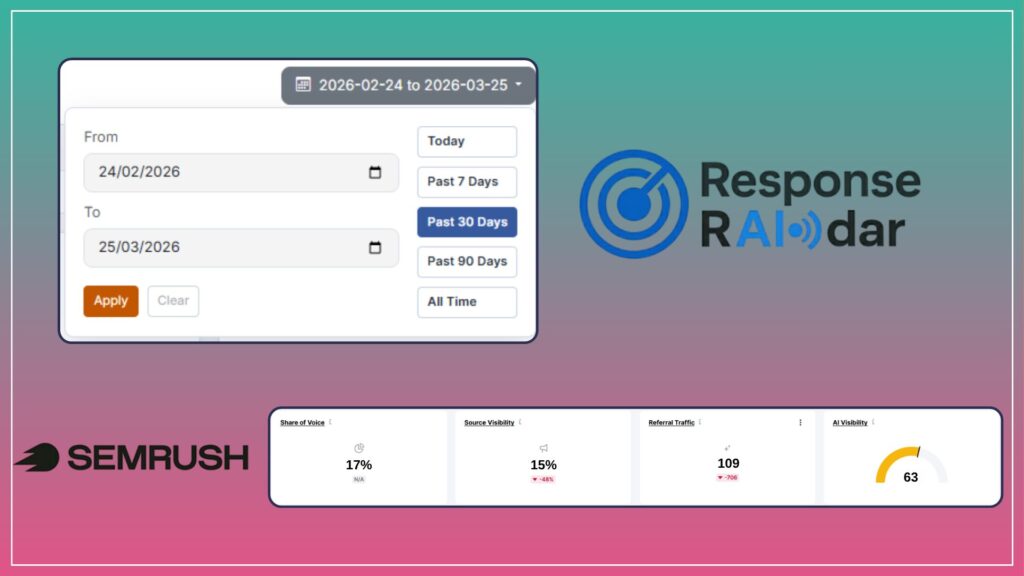
Being able to choose and compare date ranges is a fundamental part of SEO analysis. And when you first open a Response RAIdar project, you can do exactly that: select a date with ease, or choose from some pre-filtered options that give you a snapshot of your data.
This lets you explore seasonal trends or dig into a previous month’s performance to get an idea of how far you’ve come.
The SEMRush approach:
When you first land on the SEMRush AI tracker, you’re met with…very little. At least, in terms of selecting your date range.
These options do become available when you dig into specific sub-pages, but on the overview sampler, you’re presented with uncontextualised data that just feels confusing. We eventually assumed that it was a 30-day snapshot, but this is only apparent if you look at the tables that sit beneath the summary boxes. Not ideal.
3: Informational Retrieval (At a Glance)
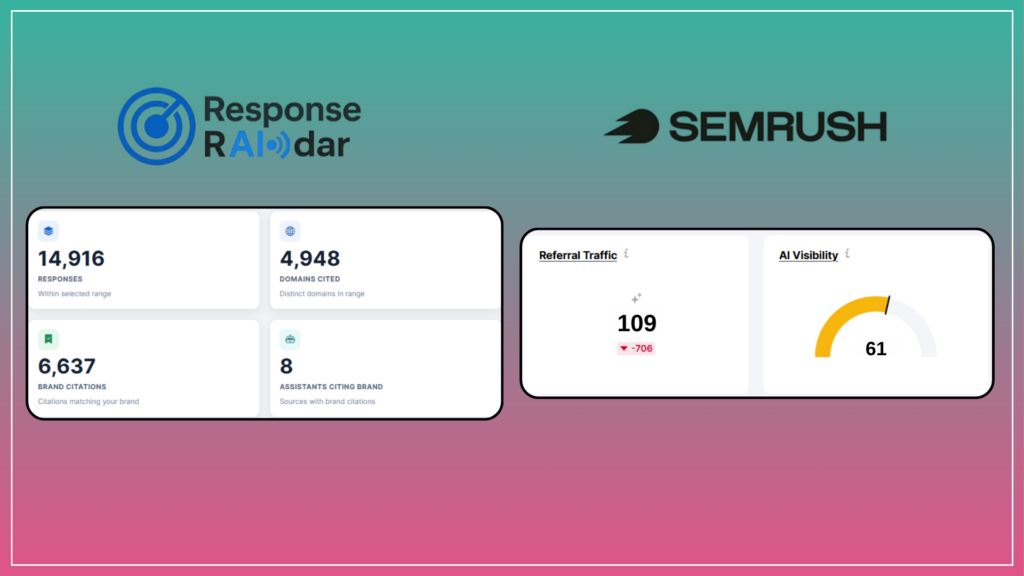
The Response RAIdar approach:
At the top of every page on the Response RAIdar platform, you’ll encounter handy cards that summarise what you’re looking at. This might include the number of responses you’ve received, or how many AI assistants are citing your brand.
While you can then dig into this information as you scroll, this handy summary is useful for quickly and easily understanding how your brand is performing.
The SEMRush approach:
SEMRush follows suit (we’re flattered, really) with summary cards. Their cards, however, lack contextualising information, which means the data isn’t overly useful at first glance.
Instead, you have to hover over the small ‘i’ near the top of each card to learn what it’s actually depicting. Although this is only one extra step, it’s unnecessary friction that makes it trickier to use the platform until you become proficient.
4: Prompt Analysis
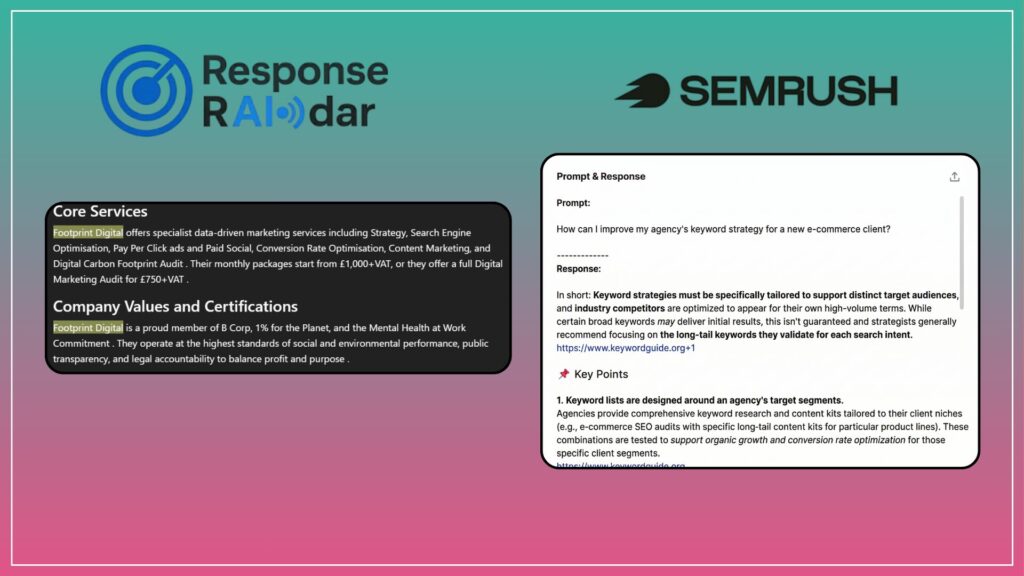
The Response RAIdar approach:
The way that almost all AI search result trackers work is by automating AI prompting and analysing the responses that are generated. With Response RAIdar, you can then explore each individual response and see how often your brand was mentioned, and the context for each mention.
We highlight your brand name every time it shows up. This is a simple quality-of-life decision, but it’s effective for easily finding what you’re looking for. If you open up one of these response windows and see yellow highlighting all over the shop, you know that you’re performing very well for that given prompt.
You’re also able to search through responses using keywords or regex, to find other details that go beyond your brand name.
The SEMRush approach:
Sadly, SEMRush doesn’t opt for an equally clear visualisation. Instead, you’re given the entire response in an unedited fashion, which means that you need to read through line-by-line to understand how your brand shows up.
When you’re presented with a 1,000+ word response, this can be a painstaking process that isn’t as user-friendly as it could be.
5: Competitor Analysis
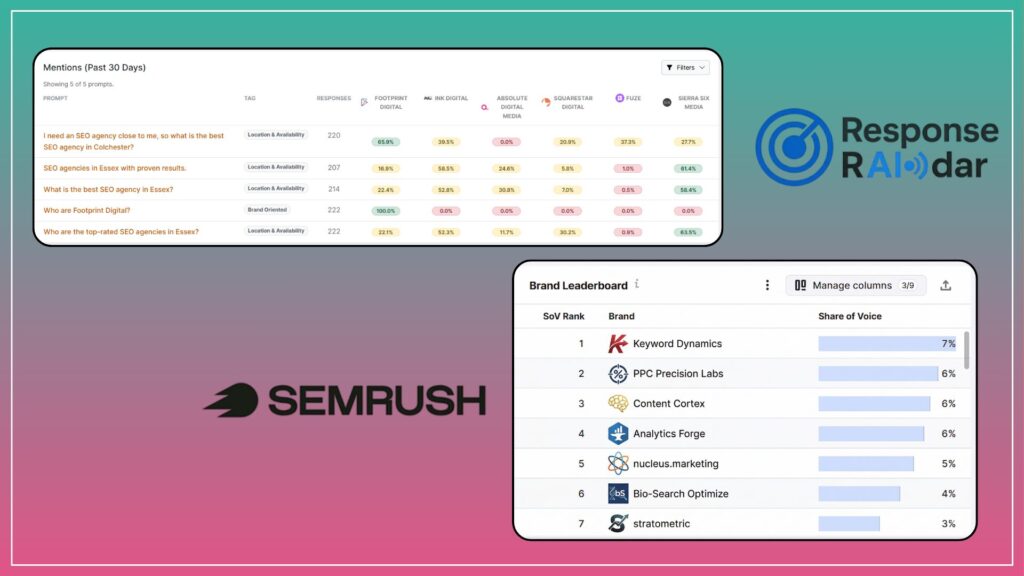
The Response RAIdar approach:
Understanding how you’re performing against competitors in AI search results is one of the best ways to build a strategy that maximises your reach. And in Response RAIdar, this couldn’t be simpler: you just need to click on a prompt you’re tracking, and you’ll have immediate visibility of how your brand stacks up against others. It’s just that simple.
You’ll also find handy charts and graphs across the tool that track your performance against your competitors over any given period.
The SEMRush approach:
You’ll find similar information in SEMRush, but it’s often hidden behind filters and sub-menus, particularly if you want to obtain simple, at-a-glance visibility rankings like you can in Response RAIdar.
Charts like the Share of Voice ranking (pictured above) are useful, but they provide vague data that requires further exploration to become truly useful.
6: Finding Prompt Responses
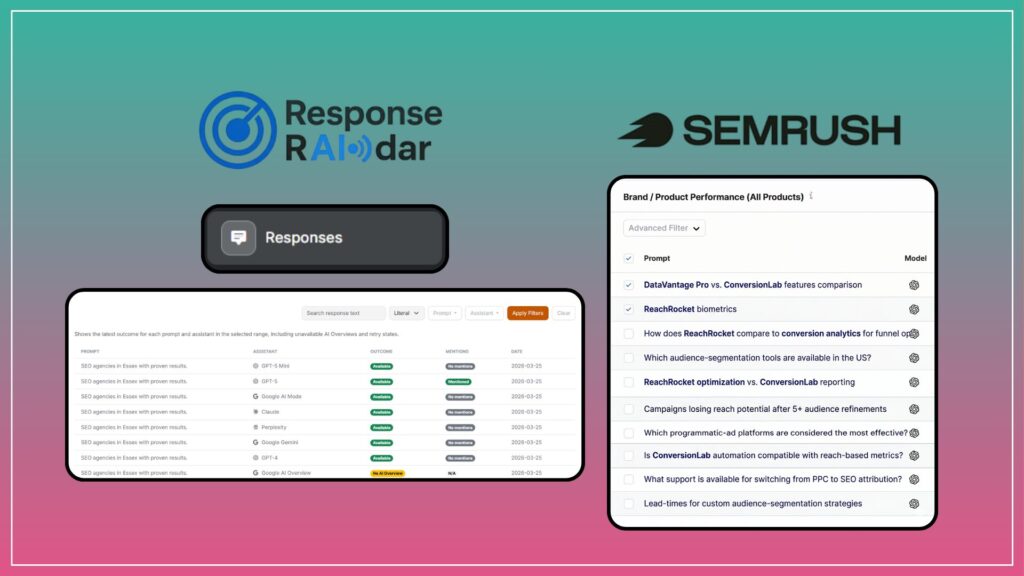
The Response RAIdar approach:
One of the benefits of an AI responses analysis tool is that it gathers incredible amounts of data and turns it into readable, user-friendly charts and graphs that summarise findings.
However, if you want to dive into the nitty-gritty of what responses have been generated, you should be able to.
That’s why there’s a dedicated ‘Responses’ tab on Response RAIdar, which shows an ever-expanding list of prompt responses that you can read through at your leisure. If you want to get a quick flavour of what LLMs are saying about your brand, here’s where you can do just that.
The SEMRush approach:
You might be noticing a pattern here, but SEMRush’s tool isn’t quite so straightforward. Instead, you have to find the prompt responses in yet another sub-menu to read through what’s being said about your brand.
It’s also not clear when these responses were generated, nor can you easily search through responses for keywords to find what you’re looking for.
7: Exporting Your Findings
The Response RAIdar approach:
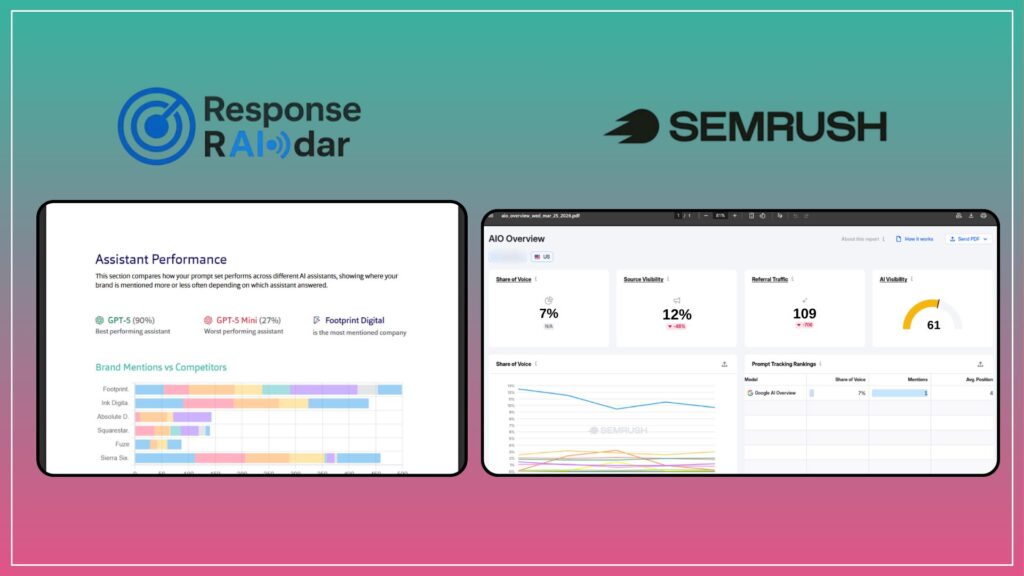
So you’ve analysed your AI search results, identified areas of opportunity, and now want to share your findings with the rest of your team. Easy: simply press the ‘Export’ button, and you’ll generate a polished, easily-readable report that summarises everything you need to know about your AI visibility.
We’ve made sure that this report is as user-friendly as possible. That means complex AI terms are explained, and your data is contextualised so that you can immediately start building an action plan. No mess, no fuss, and no PhD in SEO required.
The SEMRush approach:
This was perhaps the most surprising shortcoming of the SEMRush platform.
Once you’re done analysing data, you can also click the ‘Export’ button near the top of the screen. However, where Response RAIdar presents all of your data in one handy report, SEMRush simply takes a screenshot of whatever you’re looking at.
This is fine if you understand the data, but what if you’re taking these findings to a colleague?
What if you need to present it to another team?
You’ll need to send a lengthy email or book a meeting to run through everything, which is just one more step between you and AI visibility success.
Time to level up your AI visibility
While many of these reasons focus on the functionality of each tool, rather than data extraction, user-friendliness can’t be underrated.
A tool that is easier to use will result in more usable data, while a complex, impenetrable interface will make even basic data analysis a time-consuming and problematic task.
Response RAIdar isn’t currently accessible as a SaaS tool, but our in-house experts can use its AI visibility capabilities to identify opportunities for you and your brand. If you’d like to learn more about what Response RAIdar can do for you, get in touch with our team.